“Which certificates do I need to give to the client?”
That was the question I couldn’t answer confidently the first time I configured mTLS in MuleSoft. I understood the handshake at a high level — both sides prove who they are. What I didn’t understand was the practical side: who holds what, and where in the platform does each piece actually live?
If you’ve been there, this post is for you.
The Confusion Is Real — And It’s About Roles, Not Mechanics
The handshake itself isn’t hard to grasp. Client and server exchange certificates, verify each other’s identity, and establish a secure channel. Two sides. Two verifications. Simple enough.
The confusion starts when you try to implement it. You’re suddenly dealing with two different files — keystore and truststore — and it’s not immediately obvious which is yours, which belongs to the other party, and which goes where in the platform.
Here’s the mental model that finally made it click for me:
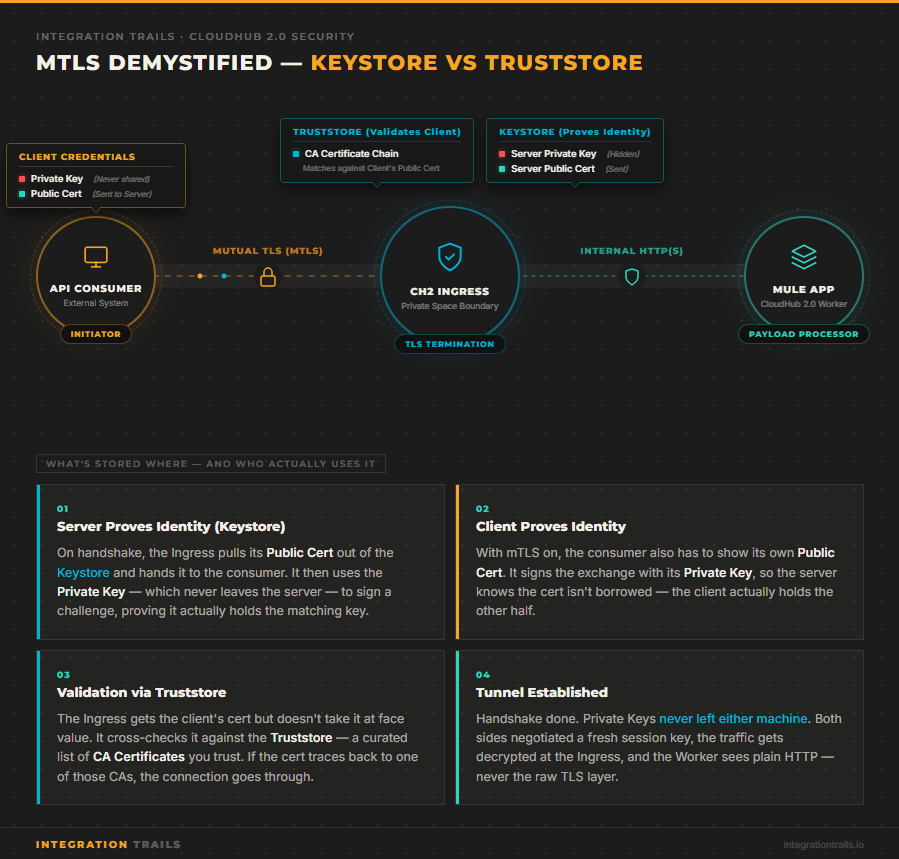
Keystore = your identity. It holds your private key and your public certificate. When you’re the server, the Ingress extracts your public cert from the keystore and hands it to the connecting client during the handshake. The private key never leaves — it only signs challenges locally to prove you hold the matching key. When the client is also expected to authenticate (which is the whole point of mTLS), they have their own keystore too.
Truststore = your list of who you trust. It holds the CA certificates of the parties you’re willing to accept. When a client connects and presents their certificate, the Ingress checks it against the CAs in the truststore. If the client’s cert traces back to a CA on that list, the connection proceeds. If not, it gets rejected — even if the certificate itself is technically valid.
Two roles. Two distinct places. That distinction is the source of 90% of the configuration problems I’ve seen.
The Most Common Failure Mode: Missing CA Chain
Out of all the mTLS issues I’ve encountered across projects, the most frequent one isn’t a wrong password or a mismatched format. It’s a missing CA chain.
Here’s how it plays out: the client sends their certificate, the configuration looks correct, and the handshake still fails. The certificate exists. The truststore exists. Everything seems to be in place.
What’s missing is the chain. The truststore contains the client’s end-entity certificate, but not the intermediate or root CA that signed it. The Ingress can’t build the chain of trust — it can’t verify that the certificate was legitimately issued by an authority it recognizes — so it rejects the connection.
The fix is straightforward once you know what you’re looking for: always include the full chain in your truststore. Root CA, intermediate CA if there is one, end-entity certificate. Not just the leaf cert.
This sounds obvious in retrospect. In practice, it’s the thing that trips up even experienced engineers, because the error messages you get from TLS failures are rarely specific about where in the chain the validation broke down.
How the Platform Evolved: DLB to TLS Context
My first experience with mTLS in MuleSoft was on CloudHub 1.0, using the Dedicated Load Balancer. The DLB was where you placed the truststore and the client’s certificates. The client received the public certificate configured for their specific domain on the DLB. It worked, but the configuration was spread across multiple places in the platform — and understanding the full picture required jumping between several screens.
CloudHub 2.0 changed this. With Private Spaces, TLS configuration is consolidated into a single construct: the TLS Context, configured directly at the Ingress level. Keystore and truststore live together, in one place, under one configuration view.
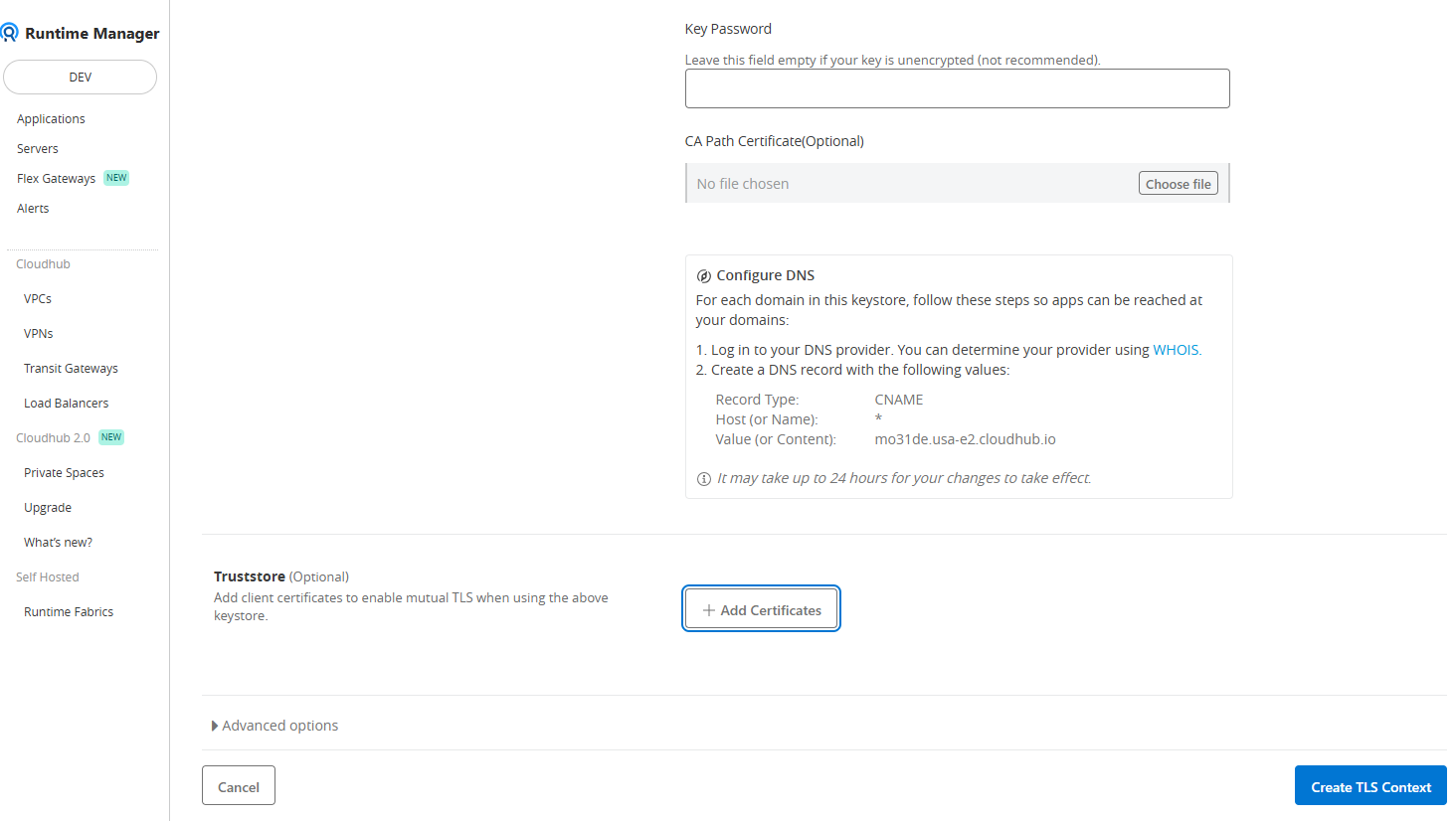
From a practical standpoint, this is a meaningful improvement. Not because the underlying concepts changed — they didn’t — but because the cognitive overhead of knowing “where is this configured?” is significantly reduced. The platform’s structure now reflects the mental model of how mTLS actually works: both sides of the authentication in one place.
The truststore in CH2 is optional. Without it, you get one-way TLS — the server proves its identity, but the client doesn’t. Adding the truststore is what activates mutual authentication. That’s a clean, intentional toggle.
When Does mTLS Actually Matter?
The scenario I encounter most often is a banking system sending payment orders through a MuleSoft Experience API. It’s a high-stakes operation — you need to be certain that the party initiating the connection is exactly the system you expect, and not just something presenting the right credentials.
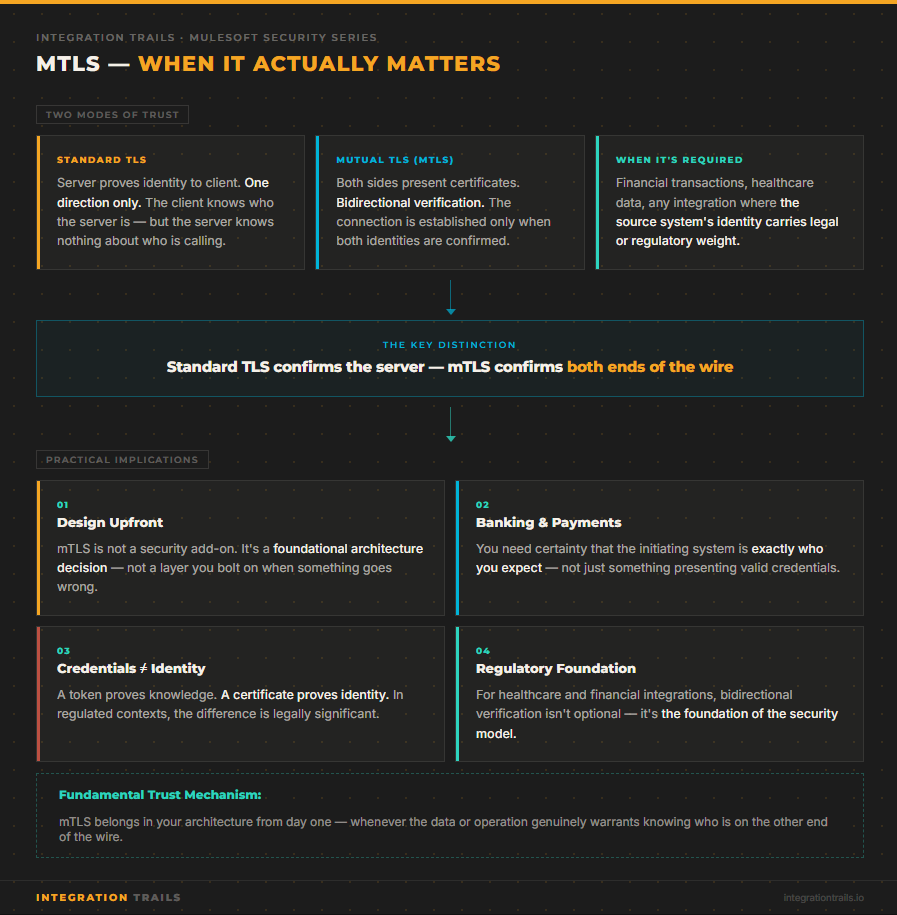
Standard TLS confirms the server’s identity to the client. That’s important, but it’s one-directional. mTLS confirms both directions. For financial transactions, healthcare data exchanges, or any integration where the source system’s identity carries legal or regulatory weight, that bidirectional verification isn’t optional — it’s the foundation of the integration’s security model.
I think of mTLS as one of the fundamental trust mechanisms in integration. Not a layer you add when something goes wrong, but something you design for from the start when the data or operation genuinely warrants it.
One Tool That Changed How I Work with Certificates
A practical note to close: if you work with certificates regularly, stop using keytool from the command line.
I switched to Keystore Explorer — a free, open-source GUI application — and it changed how I approach anything certificate-related. You can open a keystore, inspect its contents, verify the chain of trust visually, add or remove entries, and export in whatever format you need. No memorizing flags, no squinting at command-line output trying to parse a certificate chain.
For debugging mTLS issues in particular, being able to open the truststore and immediately see whether the full CA chain is present is invaluable. What used to take me several keytool -list commands and manual cross-referencing now takes thirty seconds.
What to Remember
mTLS adds a layer of complexity that’s worth understanding properly, not just copying from a working example. The core distinction is simple: keystore is your identity, truststore is your list of who you accept. Get those two roles clear, make sure your chains are complete, and the rest follows.
The platform configuration — whether you’re on CH1 with a DLB or CH2 with a TLS Context — is just a reflection of those same concepts. Once you have the mental model, the UI stops being confusing.
📘 Enjoyed this deep dive?
IntegrationTrails.io is now live! Head over to app.integrationtrails.io where you'll find hands-on learning modules built from real-world integration practice and interactive DataWeave challenges to sharpen your skills beyond theory.
Prefer staying in the loop via email? Subscribe to the newsletter and never miss a new article or module.